How frequently should you send emails?
There is no universal sending frequency that guarantees good deliverability. The ideal frequency depends specifically on the size of your audience, their engagement level, your sending history, and the habits you have established with your domain.
For email providers, the consistency of your sends is just as important as their volume. Predictable and consistent activity makes it easier to establish a good sender reputation, while sudden changes in frequency or volume can lead to a degradation in deliverability.
I. Google's recommendations
Google specifically categorizes senders based on the volume sent to personal Gmail accounts.
1. Sending fewer than around 5,000 emails per day
If you send fewer than approximately 5,000 emails per day to personal Gmail accounts, you are not considered a bulk sender under Google's specific guidelines.
However, you must still follow general deliverability best practices:
Authenticate your domain with SPF, DKIM, and DMARC
Send only to contacts who have agreed to receive your communications
Monitor complaints and bounces
Provide an easy way to unsubscribe
Maintain a consistent sending frequency
Avoid sudden spikes in volume
Even with a low volume, your sending behavior can influence how your messages are handled.
2. Sending around 5,000 emails per day or more
Google considers a sender to be a bulk sender if they reach approximately 5,000 or more messages sent to personal Gmail accounts within a 24-hour period.
This threshold is calculated at the root domain level. For example, sending 2,500 emails from example.com and 2,500 from newsletter.example.com can be counted together.
Once a domain is identified as a bulk sender, this status is permanent: subsequently reducing the sending volume does not remove this classification.
Bulk senders must specifically:
Use SPF and DKIM
Configure DMARC
Ensure DMARC alignment for direct emails
Maintain a low spam rate
Offer a one-click unsubscribe for marketing and subscribed messages
Monitor their compliance and reputation using Google Postmaster Tools
Important: The 5,000-email threshold is not a goal to reach. It is a regulatory threshold used by Google to enforce additional requirements. Sending fewer than 5,000 emails does not automatically mean your messages will be successfully delivered.
II. The importance of consistent sending frequency
Email providers do not only look at the number of emails you are sending today.
They may also take into account the sending history and habits associated with your domain and infrastructure.
Imagine two senders:
Sender A:
2,000 emails every week
Relatively stable volume
Engaged audience
Few complaints and bounces
Sender B:
No sends for several months
Then 2,000 emails sent all at once
Then nothing for several weeks
Then 20,000 emails sent suddenly
Even though both senders sent 2,000 emails during their last campaign, their activity does not have the same profile. Consistency helps build predictable sending activity.
Google actually recommends sending emails at a consistent rate, avoiding sending in bursts, and gradually increasing the volume. Google also notes that volume can be increased more quickly when sends are daily rather than weekly.
1. New domain: Be particularly gradual
If you start sending emails from a new domain, do not assume that you can immediately send the same volume as you would from a domain that has been used for several years.
A new domain has little to no sending history. It must gradually establish a reputation with the various email providers.
It is therefore best to:
Start with a reasonable volume
Prioritize targeting your most engaged contacts
Observe the results
Gradually increase the volume
Maintain a relatively consistent frequency.
Specifically, avoid abruptly jumping from a few dozen emails to several thousand emails in a single day.
The more your volume increases, the more gradual your scale-up should be. Google explicitly recommends slowly increasing the volume, starting with engaged users, and avoiding sudden spikes. (Google Help)
III. Maintaining your current sending habits
If your domain already has a sending history, try to maintain a frequency close to your usual habits.
For example, if you regularly send: 1,000 → 1,200 → 1,100 → 1,300 emails, avoid suddenly jumping to: 1,300 → 15,000 emails without any particular reason.
A significant and sudden increase in volume can result in a rate limit being applied or negatively affect your domain's reputation. Google specifically recommends avoiding sudden spikes when the sender is not used to sending large volumes.
1. Changing your autoresponder
Changing your autoresponder does not mean you have to start from scratch, but avoid immediately transferring your entire sending volume to your new provider.
Even if you use the same domain and the same contact list, changing your autoresponder can alter certain elements of your sending infrastructure: IP addresses, sending servers, message signatures or headers, technical configuration, etc.
To email providers, this is seen as a change in your sending environment.
Google specifically recommends that following a significant change in the sending infrastructure or header structure, the volume corresponding to this new traffic should be increased gradually. (Google Help)
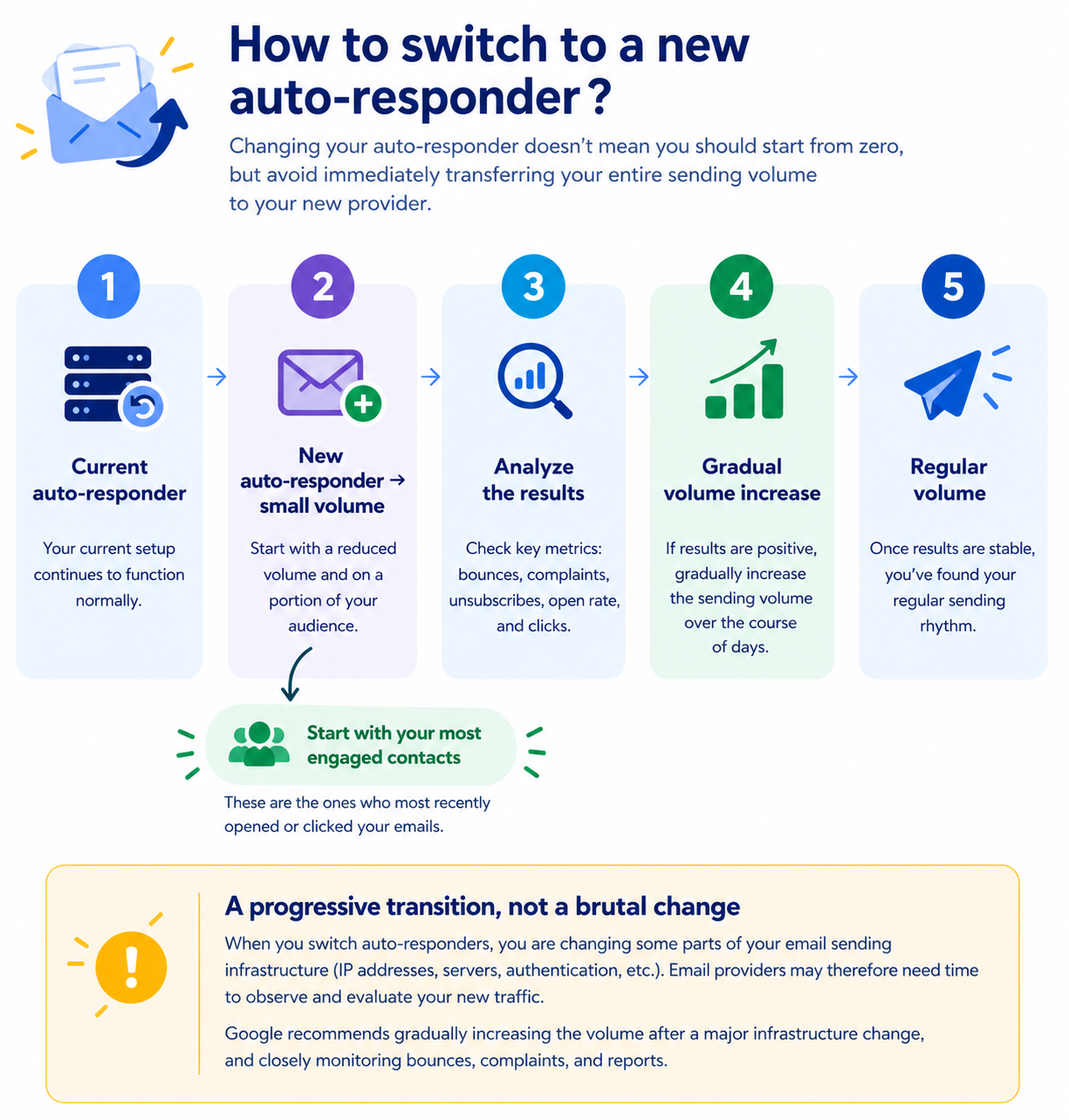
a. Making a gradual transition: For example, avoid jumping directly from:
10,000 emails/day with your old autoresponder to 10,000 emails on day one with the new one.
Opt for a gradual transition instead:
Old autoresponder
↓
New autoresponder → low volume
↓
Analyze the results
↓
Gradual increase
↓
Usual volume
Ideally, start with your most engaged contacts, those who have recently opened or clicked on your emails.
If the results remain satisfactory, gradually increase the volume over the following days.
b. Monitoring your sending performance: During the transition, pay close attention to:
Bounces
SMTP delays or errors
Spam complaints
Unsubscribe rates
Your domain reputation;
Your IP address reputation when this data is available;
Any rate limits imposed by email providers.
Google recommends monitoring server responses, the spam rate, and the domain reputation as volume increases. If messages start being deferred or rejected, it is recommended to reduce the volume until the error rate decreases, and then gradually increase it again.
c. Taking your domain's existing reputation into account: If your domain has been regularly sending emails for several months or years, do not confuse the domain's reputation with the reputation of your new sending environment.
Your domain may have a positive history, but changing autoresponders can still alter the characteristics of the traffic being sent.
It is therefore best to preserve your habits as much as possible:
A similar frequency
A comparable volume
The same types of messages
A similar audience
And, most importantly, high-quality recipients
The goal is not to restart your reputation from scratch, but rather to gradually let email providers observe the new traffic and its performance.
d. Avoiding multiple changes at once: If you change your autoresponder, avoid modifying the following simultaneously whenever possible:
Your sending domain
Your frequency
Your volume
Your content type
Your audience
Your sending address
Multiple simultaneous changes make it more difficult to identify the cause of any potential degradation in deliverability.
Therefore, an autoresponder change should be treated as a gradual transition, not just a simple change of tool.
IV. Resuming email sending after a long period of inactivity
Resuming your sends must also be gradual. If you haven't sent anything for several months, avoid treating your entire list as an "active" audience simply because the contacts are still subscribed.
Instead, start with contacts who have recently opened, clicked, or interacted with your emails.
You can then gradually expand your audience based on the results obtained.
Example of a gradual resumption:
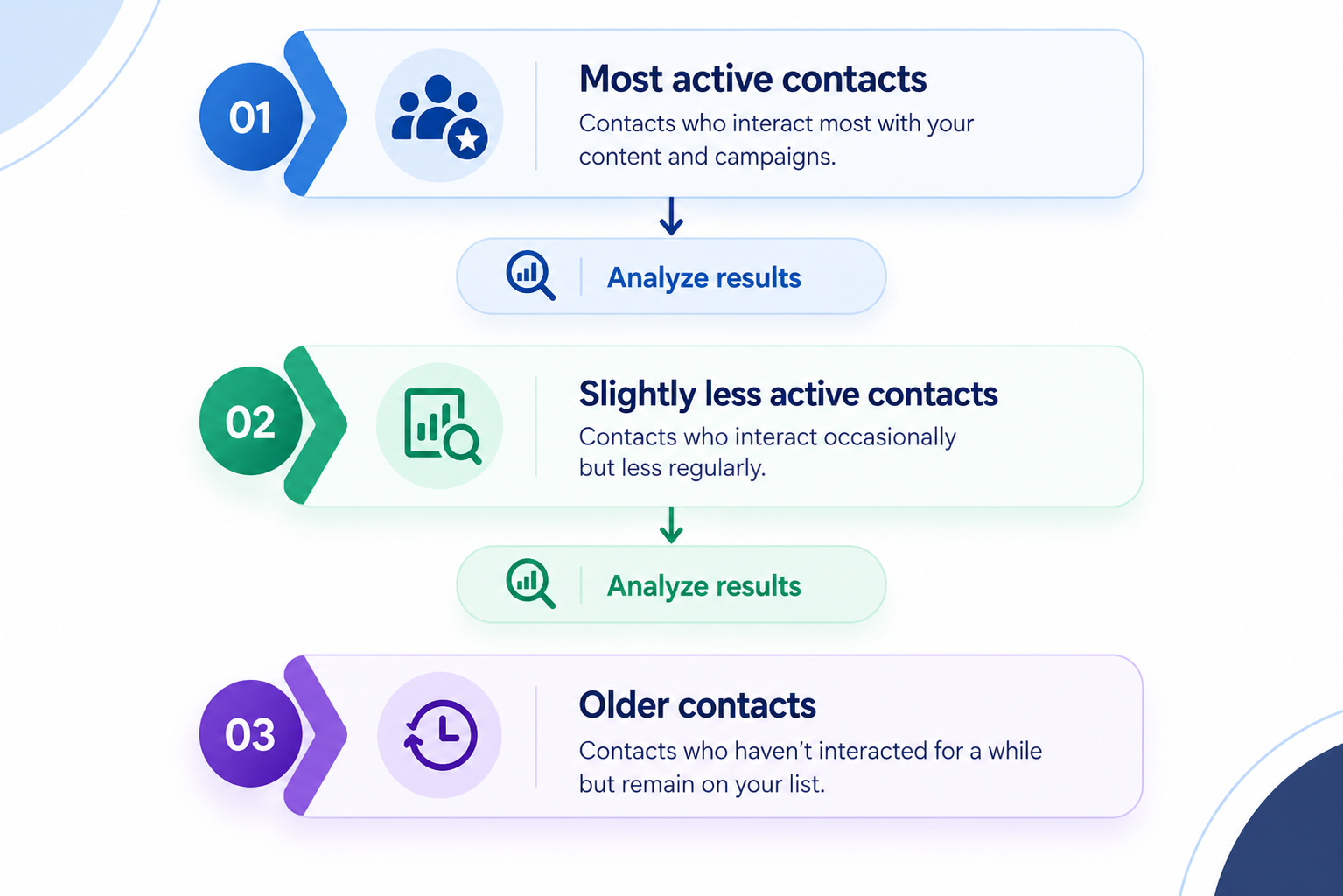
This approach allows you to quickly detect any potential performance degradation before it affects your entire list.
V. Avoiding abrupt frequency changes
Your sending frequency must also remain consistent with what your contacts expect.
If your subscribers are used to receiving one email per week, suddenly jumping to several emails per day can lead to more unsubscribes or complaints.
Conversely, if you typically send several emails per week and then disappear for several months, a sudden resumption at a high volume can also be problematic.
Your frequency should therefore be: predictable → consistent → adapted to your contacts' expectations
VI. Managing an increase in sending frequency
A frequency increase is not necessarily bad.
It becomes problematic when it is accompanied by a significant change in sending behavior or a degradation in quality signals.
Specifically, monitor:
The bounce rate
Spam complaints
Unsubscribes
Open and click rates
SMTP errors and delays
Your domain reputation
Any rate limits imposed by email providers
If you notice more delays or errors after increasing your volume, it is best to temporarily reduce the volume, identify the cause, and then gradually resume. Google recommends this approach when messages are being deferred or SMTP errors increase.
VII. Choosing the right email sending frequency
There is no magic number. The right frequency is the one that aligns with: your contacts + your history + your volume + their expectations
As a general rule:
Situation | Recommendation |
|---|---|
New domain | Start gradually |
First campaign | Prioritize your most engaged contacts |
Regular sending | Maintain a stable frequency |
Volume increase | Increase gradually |
After a long break | Resume gradually |
Sudden sharp increase | Avoid |
Rise in bounces or complaints | Reduce the volume and analyze |
Bulk sender | Regularly monitor Postmaster Tools |
Summary: Do not aim to send as many emails as possible. Aim to establish a sending frequency that is consistent, predictable, and aligned with your contacts' expectations.
Good deliverability is built over time.
Last updated on October 21, 2026
Related articles
- Why did my open rate change after switching to Systeme.io ?
- How to improve the deliverability of my emails (advanced tips)
- Re-engagement campaign: practical guide to wake up your inactive subscribers
- General guidelines and best practices for email deliverability during the first few days
- Google Postmaster Tools: an ally for your deliverability